

Why Modern Businesses Prioritize Verification
In today’s dynamic business environment, ensuring a legal workforce is not just a regulatory obligation; it’s a strategic imperative. E-Verify stands as a cornerstone of this commitment, offering employers a robust, electronic system to confirm the employment eligibility of new hires. This system plays a crucial role in safeguarding business integrity, fostering fair competition, and protecting American jobs.
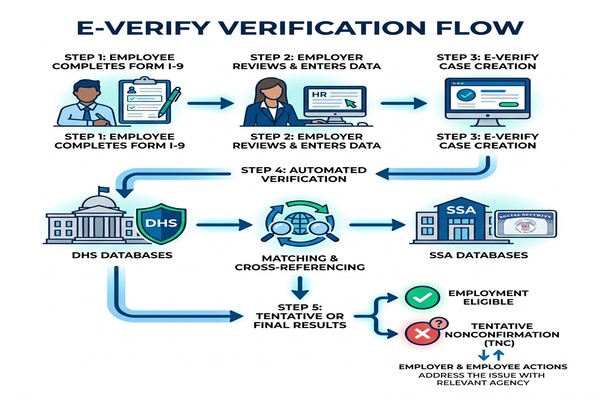
The importance of E-Verify extends beyond mere compliance. By integrating with the mandatory Form I-9 process, E-Verify provides an additional layer of verification, cross-referencing employee information against vast databases maintained by the U.S. Department of Homeland Security (DHS) and the Social Security Administration (SSA). This proactive approach helps prevent unauthorized employment, which can carry significant legal and financial risks for businesses.
For many employers, E-Verify is a voluntary tool, yet its adoption is widespread due to its effectiveness. It’s a free service, recognized as the best means available to confirm employment eligibility. While E-Verify operates within the United States and its specified territories (including the 50 states, the District of Columbia, Puerto Rico, the U.S. Virgin Islands, Guam, and the Commonwealth of the Northern Mariana Islands), its impact on workforce management is profound.
Navigating the Complexities of Workforce Compliance
Workforce compliance is a multifaceted challenge, particularly with the evolving landscape of federal and state regulations. Employers must contend with federal mandates, state-specific laws, and the overarching goal of mitigating risks associated with non-compliance. E-Verify serves as a vital tool in this intricate environment, helping businesses navigate these complexities with greater confidence.
The system’s ability to quickly verify employment eligibility helps streamline the onboarding process while ensuring adherence to legal requirements. However, effective utilization requires a clear understanding of the system’s nuances, from initial enrollment to ongoing compliance activities. For businesses seeking to optimize this process and minimize internal resource drain, exploring solutions like Outsourced E-Verify registration can be incredibly beneficial. Such services can manage the intricate details of registration and ongoing verification, allowing internal HR teams to focus on core strategic initiatives.
Achieving Workforce Compliance Through Automation
The digital nature of E-Verify offers significant advantages in achieving workforce compliance through automation. By electronically verifying information, E-Verify provides near real-time results, significantly reducing the potential for human error inherent in manual processes. This automated approach ensures consistency and accuracy in eligibility checks, which is paramount for audit preparedness.
The integration of E-Verify into existing HR and onboarding systems can further enhance efficiency. While employers can only verify one person at a time within E-Verify, and all cases must be created individually, automated system integrations can streamline the data entry and submission process. This not only improves operational efficiency but also bolsters data security by minimizing manual handling of sensitive employee information.
The Role of Federal Contractors in Workforce Compliance
For certain employers, E-Verify is not merely an option but a mandatory requirement. Federal contractors and subcontractors, for instance, are often subject to the Federal Acquisition Regulation (FAR) E-Verify Clause. This clause mandates the use of E-Verify for employees working on covered federal contracts and for all newly hired employees, with specific exemptions.
Federal contractors must be acutely aware of these obligations. During the E-Verify enrollment process, they are required to provide their Unique Entity Identifier (UEI), a critical piece of information linking their federal contracts to their E-Verify account. Understanding the nuances of the FAR E-Verify Clause, including contract value and duration exemptions, is essential for these businesses to maintain compliance. Failure to comply can result in severe penalties, including contract termination and debarment. For a comprehensive guide on these specific requirements, federal contractors can refer to resources like the E-Verify Federal Contractors Ultimate Guide.
A Step-by-Step Guide to the E-Verify Registration Process
Registering for E-Verify is a critical step for employers committed to maintaining a legal workforce. While the process is designed to be user-friendly, it requires careful attention to detail and preparation. Here, we outline the essential steps involved in the E-Verify enrollment process, ensuring you can navigate it smoothly and effectively.
The entire enrollment process must be completed within a single web session, meaning you cannot save your progress and return later. This highlights the importance of gathering all necessary information beforehand.
- Visit the E-Verify Website: Begin by navigating to the official E-Verify website (e-verify.gov) and selecting the “Enroll Now” option.
- Review and Accept Terms: You will be prompted to read and agree to the E-Verify Terms and Conditions, which outline your responsibilities as a participating employer. It’s crucial to understand these obligations fully.
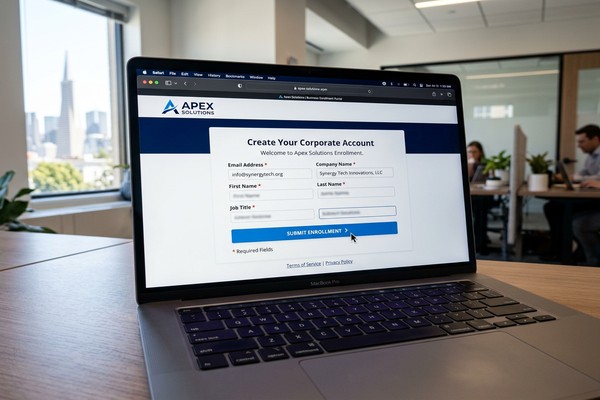
- Create a Company Account: Submit your email address to receive an activation link. This link is typically valid for a limited time and will allow you to begin creating your company’s E-Verify account.
- Determine Your Access Method: E-Verify offers four primary access methods, each suited to different organizational structures and needs. You will answer a series of questions to help determine the most appropriate method for your company. We’ll delve deeper into these options shortly.
- Select Your Employer Category: Indicate whether your organization is a federal contractor (with or without the FAR E-Verify Clause), a federal, state, or local government agency, or a general employer. This selection influences specific compliance requirements.
- Provide Company Information: Enter your company’s legal name, primary physical address, mailing address (if different), Employer Identification Number (EIN), and the total number of current employees. You will also need to provide your North American Industry Classification System (NAICS) code, which categorizes your business activity. If you are unsure of your NAICS code, E-Verify provides a lookup tool.
- Designate Hiring Sites: Specify the physical locations where your company hires employees and completes Form I-9. You can add these individually or, for multiple locations, use a bulk upload CSV file.
- Assign Roles (Program Administrator & Signatory): You must designate at least one Program Administrator and one Signatory. These roles can be held by the same person. The Program Administrator manages the company profile and user accounts, while the Signatory formally agrees to the Terms and Conditions.
- Review and Submit: Carefully review all the information you’ve entered for accuracy. Once confirmed, submit your enrollment application.
- Save Confirmation: After submission, you will receive an enrollment confirmation. It is vital to save or print a copy of your electronically signed E-Verify Terms and Conditions of the Memorandum of Understanding (MOU) and any E-Verify+ Terms of Service for your records.
Prerequisites for a Smooth Enrollment
To ensure a seamless E-Verify enrollment process, having all necessary information readily available before you begin is paramount. The entire process must be completed in a single web session. Key information you’ll need includes:
- Employer Identification Number (EIN): Your company’s unique federal tax ID.
- Legal Company Name: As registered with the IRS.
- Primary Physical Address: The main operational address of your business.
- Mailing Address: If different from the physical address.
- Total Number of Current Employees: An accurate count of your workforce.
- NAICS Code: Your industry classification code.
- Contact Information for a Signatory: Full name, title, phone number, and email address of the individual authorized to sign the MOU.
- Contact Information for a Program Administrator: Full name, title, phone number, and email address of the individual who will manage the E-Verify account.
- Hiring Site Information: A list of all physical locations where new employees will be hired and Form I-9s completed. For detailed guidance on preparing for enrollment, refer to resources like the E-Verify Employer Requirements page.
Choosing the Right Access Method
One of the crucial decisions during enrollment is selecting the appropriate E-Verify access method. The four access methods are:
- Employer Access: This is the most common method, allowing employers to directly verify their own employees.
- E-Verify Employer Agent Access: For third-party agents who verify employees on behalf of other businesses.
- Corporate Administrator Access: Designed for large organizations with multiple hiring locations that need a centralized management system for their E-Verify accounts.
- Web Services Access: For employers who wish to integrate E-Verify directly into their existing HR or payroll software systems via an Application Programming Interface (API).
Most companies will opt for Employer Access. Corporate Administrator access, while useful for complex structures, requires more time and effort to set up and is typically not needed for most businesses. E-Verify+ features are currently available only to the Employer access method. E-Verify will guide you through a series of questions to help you determine the best fit for your organization. Understanding these distinctions is key to setting up your system efficiently.
| Access Method | Description <pre><code> </code></pre> markdown
Why Modern Businesses Prioritize Verification
Ensuring a legal workforce is a cornerstone of responsible business operations in the United States. The E-Verify registration process is a critical first step for employers to electronically confirm the employment eligibility of new hires. This vital system helps businesses comply with federal immigration laws and uphold ethical hiring practices.
We understand that navigating federal and state compliance requirements can seem complex. This comprehensive how-to guide aims to demystify the E-Verify enrollment journey for employers. We will walk you through the essential steps, from understanding prerequisites and choosing the right access method to managing post-enrollment responsibilities.
For businesses seeking to streamline this crucial process, exploring options like Outsourced E-Verify registration can offer significant advantages, ensuring accuracy and efficiency from the outset. In the following sections, we will equip you with the knowledge needed to confidently register for E-Verify, maintain compliance, and prepare for key updates in 2025.
Navigating the Complexities of Workforce Compliance
Workforce compliance is a multifaceted challenge, particularly with the evolving landscape of federal and state regulations. Employers must contend with federal mandates, state-specific laws, and the overarching goal of mitigating risks associated with non-compliance. E-Verify serves as a vital tool in this intricate environment, helping businesses navigate these complexities with greater confidence.
The importance of E-Verify extends beyond mere compliance. By integrating with the mandatory Form I-9 process, E-Verify provides an additional layer of verification, cross-referencing employee information against vast databases maintained by the U.S. Department of Homeland Security (DHS) and the Social Security Administration (SSA). This proactive approach helps prevent unauthorized employment, which can carry significant legal and financial risks for businesses.
For many employers, E-Verify is a voluntary tool, yet its adoption is widespread due to its effectiveness. It’s a free service, recognized as the best means available to confirm employment eligibility. While E-Verify operates within the United States and its specified territories (including the 50 states, the District of Columbia, Puerto Rico, the U.S. Virgin Islands, Guam, and the Commonwealth of the Northern Mariana Islands), its impact on workforce management is profound.
Effective utilization requires a clear understanding of the system’s nuances, from initial enrollment to ongoing compliance activities. For businesses seeking to optimize this process and minimize internal resource drain, exploring solutions like Outsourced E-Verify registration can be incredibly beneficial. Such services can manage the intricate details of registration and ongoing verification, allowing internal HR teams to focus on core strategic initiatives. This approach ensures audit preparedness and leverages the expertise of specialists in SSA databases and DHS authoritative sources.
Achieving Workforce Compliance Through Automation
The digital nature of E-Verify offers significant advantages in achieving workforce compliance through automation. By electronically verifying information, E-Verify provides near real-time results, significantly reducing the potential for human error inherent in manual processes. This automated approach ensures consistency and accuracy in eligibility checks, which is paramount for audit preparedness.
The integration of E-Verify into existing HR and onboarding systems can further enhance efficiency. While employers can only verify one person at a time within E-Verify, and all cases must be created individually, automated system integrations can streamline the data entry and submission process. This not only improves operational efficiency but also bolsters data security by minimizing manual handling of sensitive employee information. For insights into how such systems can be integrated, consider reviewing information on E-Verify System Requirements Guide.
The Role of Federal Contractors in Workforce Compliance
For certain employers, E-Verify is not merely an option but a mandatory requirement. Federal contractors and subcontractors, for instance, are often subject to the Federal Acquisition Regulation (FAR) E-Verify Clause. This clause mandates the use of E-Verify for employees working on covered federal contracts and for all newly hired employees, with specific exemptions.
Federal contractors must be acutely aware of these obligations. During the E-Verify enrollment process, they are required to provide their Unique Entity Identifier (UEI), a critical piece of information linking their federal contracts to their E-Verify account. Understanding the nuances of the FAR E-Verify Clause, including contract value and duration exemptions, is essential for these businesses to maintain compliance. Failure to comply can result in severe penalties, including contract termination and debarment. For a comprehensive guide on these specific requirements, federal contractors can refer to resources like the E-Verify Federal Contractors Ultimate Guide. Further details on specific exemptions can be found on the E-Verify website’s section for Exemptions and Special Rules.
A Step-by-Step Guide to the E-Verify Registration Process
Registering for E-Verify is a critical step for employers committed to maintaining a legal workforce. While the process is designed to be user-friendly, it requires careful attention to detail and preparation. Here, we outline the essential steps involved in the E-Verify enrollment process, ensuring you can navigate it smoothly and effectively.
The entire enrollment process must be completed within a single web session, meaning you cannot save your progress and return later. This highlights the importance of gathering all necessary information beforehand.
- Visit the E-Verify Website: Begin by navigating to the official E-Verify website (e-verify.gov) and selecting the “Enroll Now” option. The direct enrollment link is https://everify.uscis.gov/enroll.
- Review and Accept Terms: You will be prompted to read and agree to the E-Verify Terms and Conditions, which outline your responsibilities as a participating employer. It’s crucial to understand these obligations fully.
- Create a Company Account: Submit your email address to receive an activation link. This link is typically valid for a limited time and will allow you to begin creating your company’s E-Verify account.
- Determine Your Access Method: E-Verify offers four primary access methods, each suited to different organizational structures and needs. You will answer a series of questions to help determine the most appropriate method for your company. We’ll delve deeper into these options shortly.
- Select Your Employer Category: Indicate whether your organization is a federal contractor (with or without the FAR E-Verify Clause), a federal, state, or local government agency, or a general employer. This selection influences specific compliance requirements.
- Provide Company Information: Enter your company’s legal name, primary physical address, mailing address (if different), Employer Identification Number (EIN), and the total number of current employees. You will also need to provide your North American Industry Classification System (NAICS) code, which categorizes your business activity. If you are unsure of your NAICS code, E-Verify provides a lookup tool.
- Designate Hiring Sites: Specify the physical locations where your company hires employees and completes Form I-9. You can add these individually or, for multiple locations, use a bulk upload CSV file. This is crucial for accurately tracking where employment eligibility checks are performed.
- Assign Roles (Program Administrator & Signatory): You must designate at least one Program Administrator and one Signatory. These roles can be held by the same person. The Program Administrator manages the company profile and user accounts, while the Signatory formally agrees to the Terms and Conditions.
- Review and Submit: Carefully review all the information you’ve entered for accuracy. Once confirmed, submit your enrollment application.
- Save Confirmation: After submission, you will receive an enrollment confirmation. It is vital to save or print a copy of your electronically signed E-Verify Terms and Conditions of the Memorandum of Understanding (MOU) and any E-Verify+ Terms of Service for your records. This confirmation page verifies that your enrollment information has been received.
Prerequisites for a Smooth Enrollment
To ensure a seamless E-Verify enrollment process, having all necessary information readily available before you begin is paramount. The entire process must be completed in a single web session. Key information you’ll need includes:
- Employer Identification Number (EIN): Your company’s unique federal tax ID.
- Legal Company Name: As registered with the IRS.
- Primary Physical Address: The main operational address of your business.
- Mailing Address: If different from the physical address.
- Total Number of Current Employees: An accurate count of your workforce.
- NAICS Code: Your industry classification code.
- Contact Information for a Signatory: Full name, title, phone number, and email address of the individual authorized to sign the MOU.
- Contact Information for a Program Administrator: Full name, title, phone number, and email address of the individual who will manage the E-Verify account.
- Hiring Site Information: A list of all physical locations where new employees will be hired and Form I-9s completed. For detailed guidance on preparing for enrollment, refer to resources like the E-Verify Employer Requirements page.
Choosing the Right Access Method
One of the crucial decisions during enrollment is selecting the appropriate E-Verify access method. The four access methods, as outlined by E-Verify, include:
- Employer Access: This is the most common method, allowing employers to directly verify their own employees. It’s suitable for businesses that manage their E-Verify cases in-house.
- E-Verify Employer Agent Access: This method is for third-party organizations, such as payroll companies or HR service providers, who verify employees on behalf of other businesses. If you’re considering outsourcing your E-Verify needs, this is the access method your agent would use. Learn more about this service at E-Verify Employer Agent Service.
- Corporate Administrator Access: Designed for large organizations with multiple hiring locations that need a centralized management system for their E-Verify accounts. A corporate administrator can manage multiple employer accounts, but they do not create individual cases themselves. Most companies do not need corporate administrator access, as it requires more setup time and effort.
- Web Services Access: For employers who wish to integrate E-Verify directly into their existing HR or payroll software systems via an Application Programming Interface (API). This offers a highly customized and automated solution for high-volume users.
E-Verify will guide you through a series of questions to help you determine the best fit for your organization. Understanding these distinctions is key to setting up your system efficiently, especially when considering corporate oversight or multi-location management strategies.